Introduction
If you run an online store on Salla and use Google Merchant Center to promote your products on Google Shopping, you may encounter one of the most serious account issues: Google Merchant Misrepresentation on Salla.
Google Merchant Misrepresentation on Salla can prevent your products from appearing on Google. In some cases, it may even lead to a complete Google Merchant Center account suspension. As a result, your store could lose valuable visibility, organic traffic, and potential sales.
However, misrepresentation is not the only challenge Salla store owners may face. For example, your account may also experience product disapprovals, price mismatches, incorrect availability, shipping issues, missing product information, or product feed errors. Therefore, identifying the exact cause of the problem is essential before submitting a review request to Google.
In this guide, we will explain what Google Merchant Misrepresentation on Salla means, why it happens, and how to fix it step by step. Moreover, you will learn about other common Google Merchant Center issues that can reduce your product visibility and negatively affect your store’s performance.
Finally, by following the recommendations in this guide, you can improve your store’s compliance with Google Merchant Center policies, resolve critical account issues, restore your products on Google Shopping, and increase your chances of achieving long-term success on the Salla platform.
What Is Google Merchant Misrepresentation?
Google Merchant Misrepresentation occurs when Google determines that an online store does not provide clear, accurate, or trustworthy information to customers. In other words, Google believes that the information presented on your website may be misleading or inconsistent with the data submitted to Google Merchant Center.
For example, the issue may be caused by something as simple as a missing return and refund policy, incomplete contact information, or unclear shipping details. However, it can also result from inaccurate business information, inconsistent product data, misleading content, or store practices that do not comply with Google Merchant Center policies.
When Google detects Google Merchant Misrepresentation on Salla, it may take one or more of the following actions:
- Disapprove individual products.
- Remove products from Google Shopping results.
- Suspend your entire Google Merchant Center account.
- Restrict your ability to advertise products across Google services.
As a result, your products may lose visibility, your traffic may decrease, and your sales could be negatively affected.
Therefore, it is essential to identify the real cause of the issue before submitting a review request. By fixing the underlying problems first, you can improve your store’s compliance with Google policies and significantly increase your chances of restoring your Google Merchant Center account.
Common Google Merchant Center Issues for Salla Stores
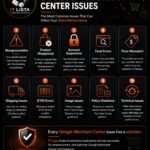
Although this guide focuses on Google Merchant Misrepresentation on Salla, misrepresentation is not the only issue that can affect your Google Merchant Center account.
For example, Salla store owners may also experience:
- Product disapprovals
- Feed errors
- Price mismatches
- Shipping issues
- GTIN errors
- Image quality issues
- Policy violations
- Account suspension
- Incorrect product availability
- Missing or incomplete product information
Moreover, each of these issues can reduce your product visibility, prevent your products from appearing on Google Shopping, or even lead to account restrictions.
Therefore, understanding the most common Google Merchant Center issues is the first step toward maintaining a healthy Merchant Center account. In the following sections, we will explain each issue, discuss its possible causes, and show you how to resolve it effectively.
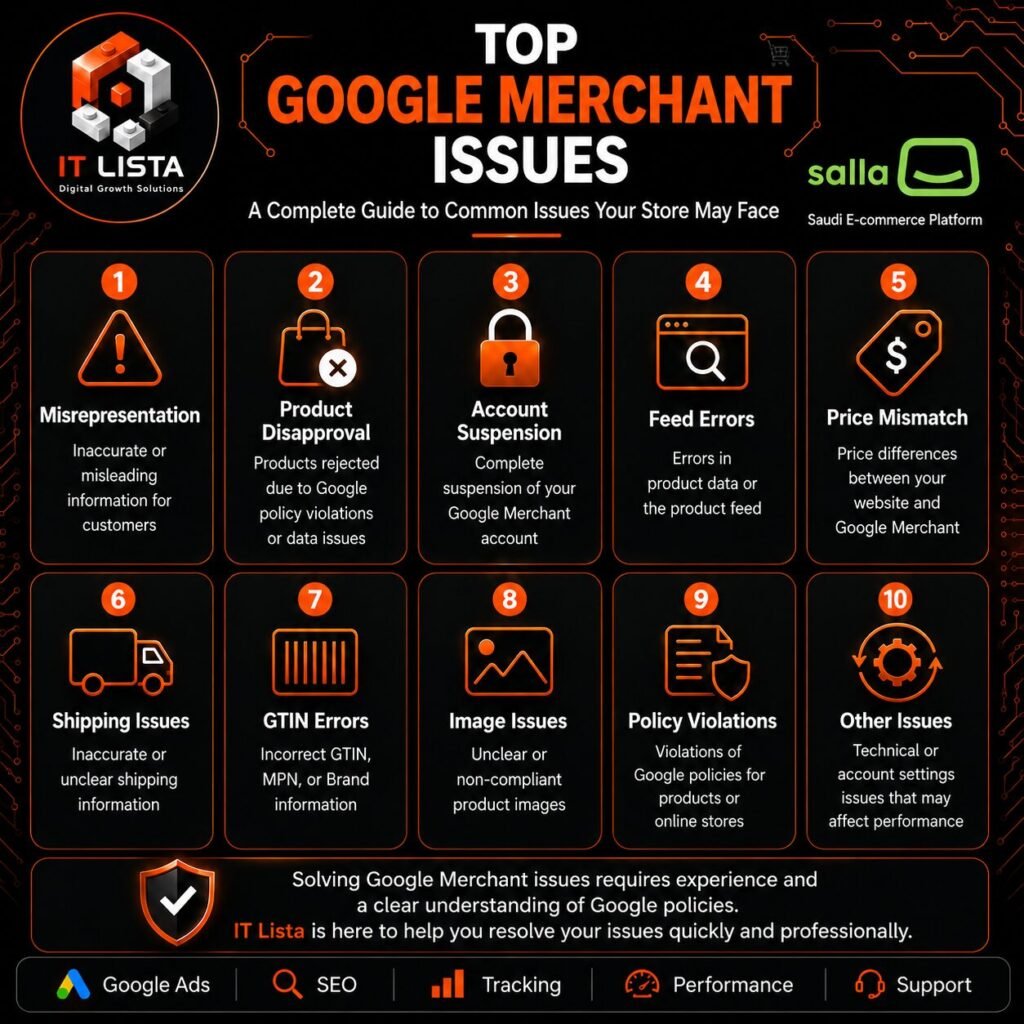
1. Misrepresentation
Google Merchant Misrepresentation on Salla is one of the most serious issues that can affect your Google Merchant Center account. It usually occurs when Google cannot verify important business information or when your store does not provide customers with clear, accurate, and trustworthy details.
As a result, Google may disapprove your products, limit their visibility, or even suspend your entire Google Merchant Center account.
2. Product Disapproval
Product disapproval occurs when Google rejects one or more products because of missing information, incorrect product data, policy violations, or feed errors.
Consequently, disapproved products become ineligible to appear on Google Shopping until the underlying issues have been resolved.
3. Google Merchant Center Account Suspension
In some cases, Google may suspend your entire Google Merchant Center account because of serious or repeated policy violations.
Therefore, before requesting an account review, carefully review your website, business information, product data, and every notification displayed inside Merchant Center.
4. Products Not Appearing on Google Shopping
Even if your products are approved, they may not receive the visibility you expect.
For example, poor product data quality, weak optimization, or incorrect Merchant Center settings can reduce your products’ visibility on Google Shopping.
For this reason, review your product information, listings, and Merchant Center settings regularly.
5. Price Mismatch
The price displayed on your Salla store should always match the price submitted to Google Merchant Center.
If Google detects any difference, the affected product may be disapproved.
Therefore, keeping your website and Merchant Center data synchronized is essential.
6. Availability Mismatch
An availability mismatch occurs when a product is marked as In Stock in Google Merchant Center but is actually unavailable on your Salla store, or vice versa.
To avoid this problem, make sure your inventory is updated automatically and synchronized correctly at all times.
7. GTIN, MPN, and Brand Errors
Product identifiers help Google classify products accurately and improve their visibility.
However, missing or incorrect GTIN, MPN, or Brand information may create product data issues and lead to product disapprovals.
Therefore, always provide accurate product identifiers whenever they are available.
8. Shipping and Tax Issues
Incorrect or inconsistent shipping information can negatively affect your Google Merchant Center account.
For example, shipping costs, delivery times, and shipping methods displayed on your website should match the settings configured in Merchant Center.
Likewise, tax information should also remain accurate and consistent.
9. Product Feed Issues
Your product feed provides Google with all the essential information about your products.
Therefore, missing attributes, outdated data, invalid URLs, synchronization failures, or formatting errors can reduce product visibility or cause product disapprovals.
For this reason, review and optimize your product feed regularly to prevent unnecessary issues.
10. Missing or Incomplete Store Pages
Finally, your Salla store should include all the essential pages that help customers trust your business.
These pages typically include:
- Return and Refund Policy
- Shipping and Delivery Policy
- Contact Information
- About Us Page
- Privacy Policy
- Terms and Conditions
Moreover, every page should be complete, accurate, and easy to access from your website.
Overall, although Google Merchant Misrepresentation on Salla is one of the most serious issues, it should not be your only concern.
Instead, review your entire Google Merchant Center account, product feed, business information, and website policies to identify and resolve every issue that may affect your store’s visibility.
Next, let’s explore the most common causes of Google Merchant Misrepresentation on Salla and learn what you should review before submitting a Google Merchant Center account review request.
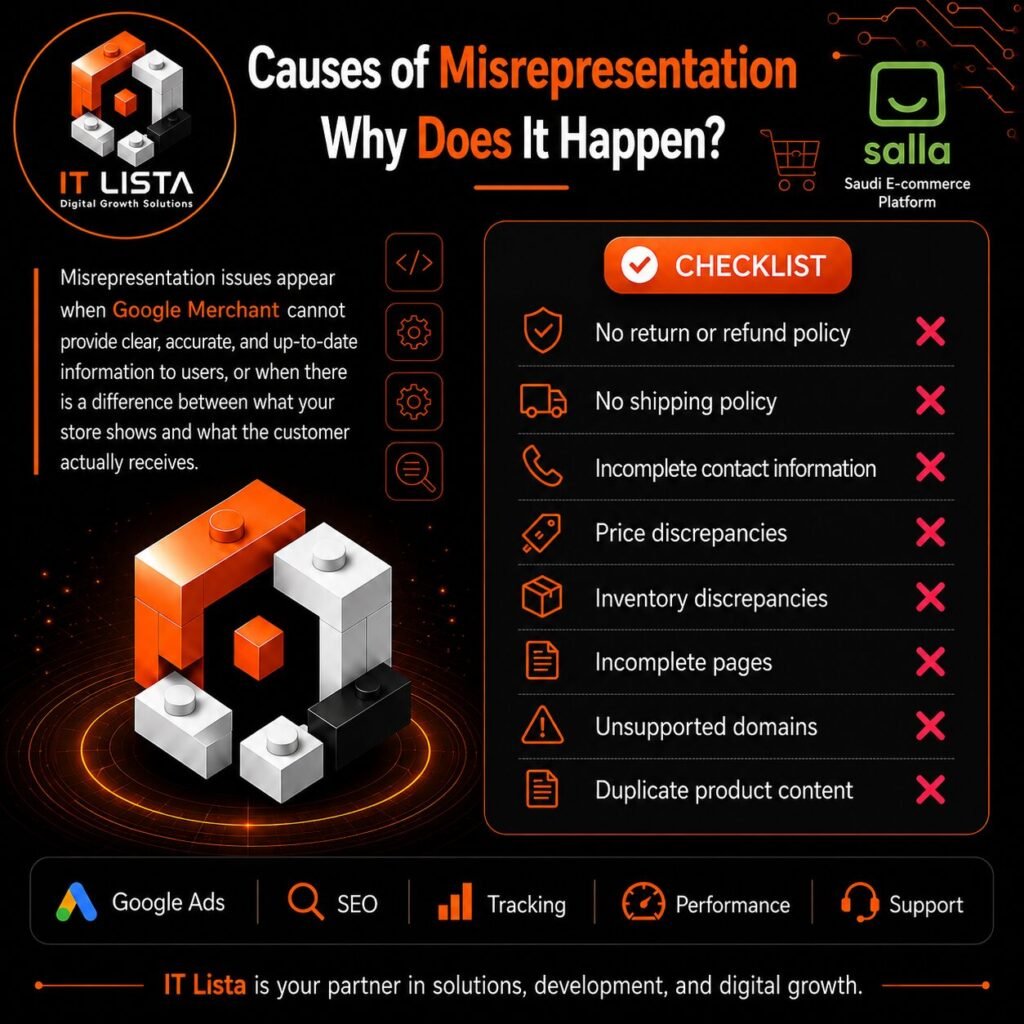
Several factors can trigger a misrepresentation issue for Salla stores. In many cases, the problem is related to missing business information, unclear store policieWhy Does Google Merchant Misrepresentation Occur on Salla?
Several factors can trigger Google Merchant Misrepresentation on Salla. In many cases, the issue is caused by missing business information, unclear store policies, inaccurate product data, or inconsistencies between your Salla store and Google Merchant Center.
The most common causes include:
- Missing return and refund policies.
- Missing or unclear shipping and delivery information.
- Incomplete contact details.
- Insufficient business information.
- Price mismatches between Salla and Google Merchant Center.
- Incorrect or inconsistent product availability.
- Inaccurate product descriptions or images.
- Products that do not comply with Google policies.
- Missing HTTPS security.
- Domain verification or trust-related issues.
- Broken links or incomplete pages.
- Copied or low-quality product descriptions.
Therefore, before requesting a review, carefully audit your entire Salla store instead of focusing on a single product or warning.
In addition, make sure your business details, store policies, product information, and Merchant Center data are accurate, complete, and consistent.
Once you identify the potential causes, the next step is to fix them systematically. In the following section, we will explain how to fix Google Merchant Misrepresentation on Salla step by step.
How to Fix Google Merchant Misrepresentation on Salla
If your Salla store has been affected by a misrepresentation issue, avoid requesting a review immediately.
Instead, review your store carefully and fix any potential policy, product, business information, or technical issues first.
By doing this, you can improve your store’s compliance, reduce the risk of another rejection, and prepare your Google Merchant Center account for review.
Follow the steps below to resolve the issue and improve your chances of restoring your products on Google Shopping.
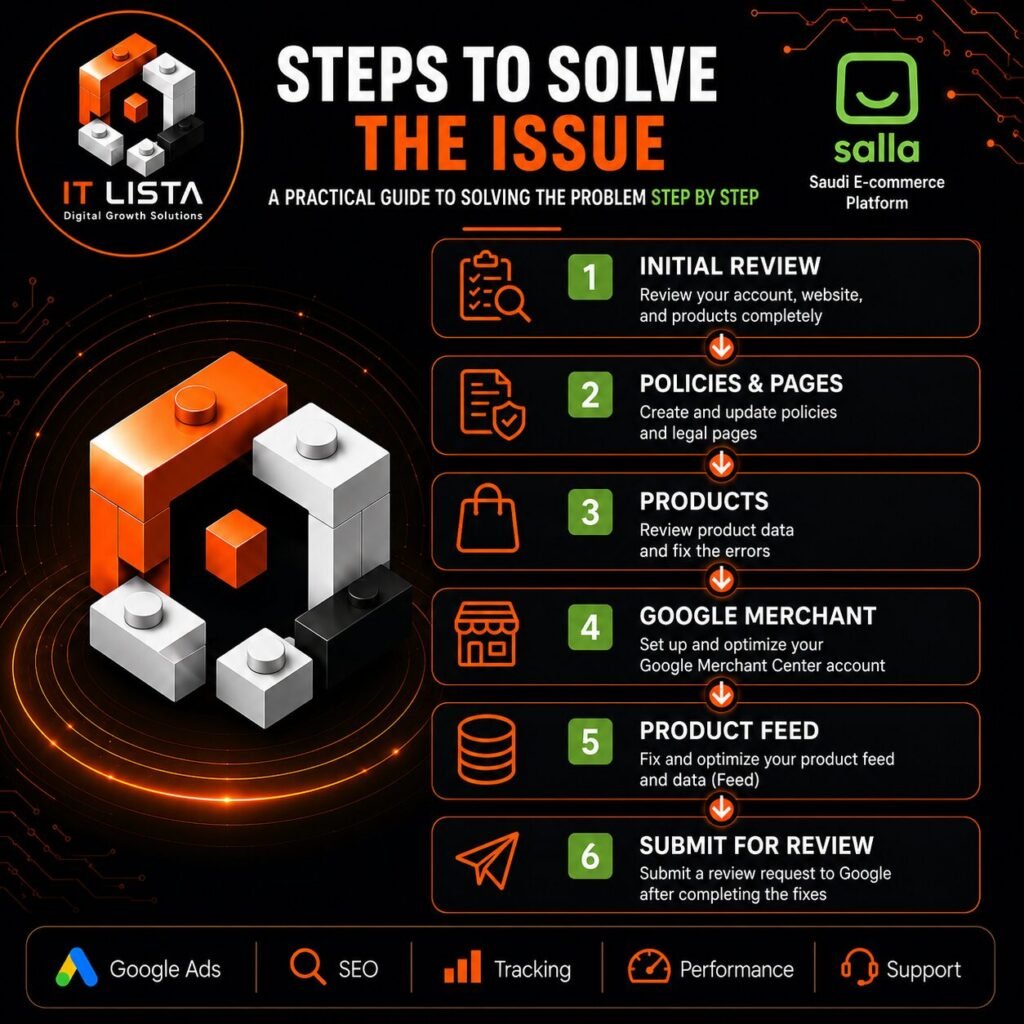
1. Review Your Business Information
First, make sure your business information is complete, accurate, and consistent across both your Salla store and Google Merchant Center.
Review the following details carefully:
- Business name
- Contact email address
- Valid phone number
- Business address (when applicable)
- Contact Us page
- Verified website domain
In addition, customers should be able to identify your business easily and find a clear way to contact you. Accurate business information helps Google verify your store and reduces the risk of Google Merchant Misrepresentation on Salla.
2. Create Clear Store Policies
Next, review all essential policy pages on your Salla store. These pages should provide customers with clear, accurate, and transparent information before they complete a purchase.
Your store should include:
- Return and Refund Policy
- Shipping and Delivery Policy
- Privacy Policy
- Terms and Conditions
Moreover, these policies should accurately reflect how your business operates. Avoid using copied, incomplete, or generic policies that do not match your actual shipping, return, or refund processes.
3. Review Your Product Information
After reviewing your store policies, inspect every product page carefully.
Each product page should include:
- A clear product title
- An original and detailed description
- High-quality product images
- Accurate pricing
- Correct product availability
- Brand information (when applicable)
- GTIN or MPN (when required and available)
Furthermore, avoid misleading claims, duplicate descriptions, or inaccurate product information that does not represent the actual product customers will receive.
4. Check Prices and Product Availability
Your product prices and inventory should always remain synchronized between your Salla store and Google Merchant Center.
For example, if a product is out of stock on your website but appears as available in Merchant Center, Google may detect an availability mismatch. Likewise, price differences between your website and Merchant Center can lead to product disapprovals.
Therefore, update your product data regularly and ensure all information remains consistent across both platforms.
Review Your Merchant Center Configuration
5. Review Your Google Merchant Center Account
Once your store has been updated, review every notification and issue reported in Google Merchant Center.
Pay close attention to:
- Misrepresentation warnings
- Product disapprovals
- Policy violations
- Missing product attributes
- Feed or data source errors
- Website or crawling issues
However, do not focus only on the Google Merchant Misrepresentation on Salla warning. Other unresolved issues may also reduce your product visibility or even lead to account suspension.
6. Review and Update Your Product Data
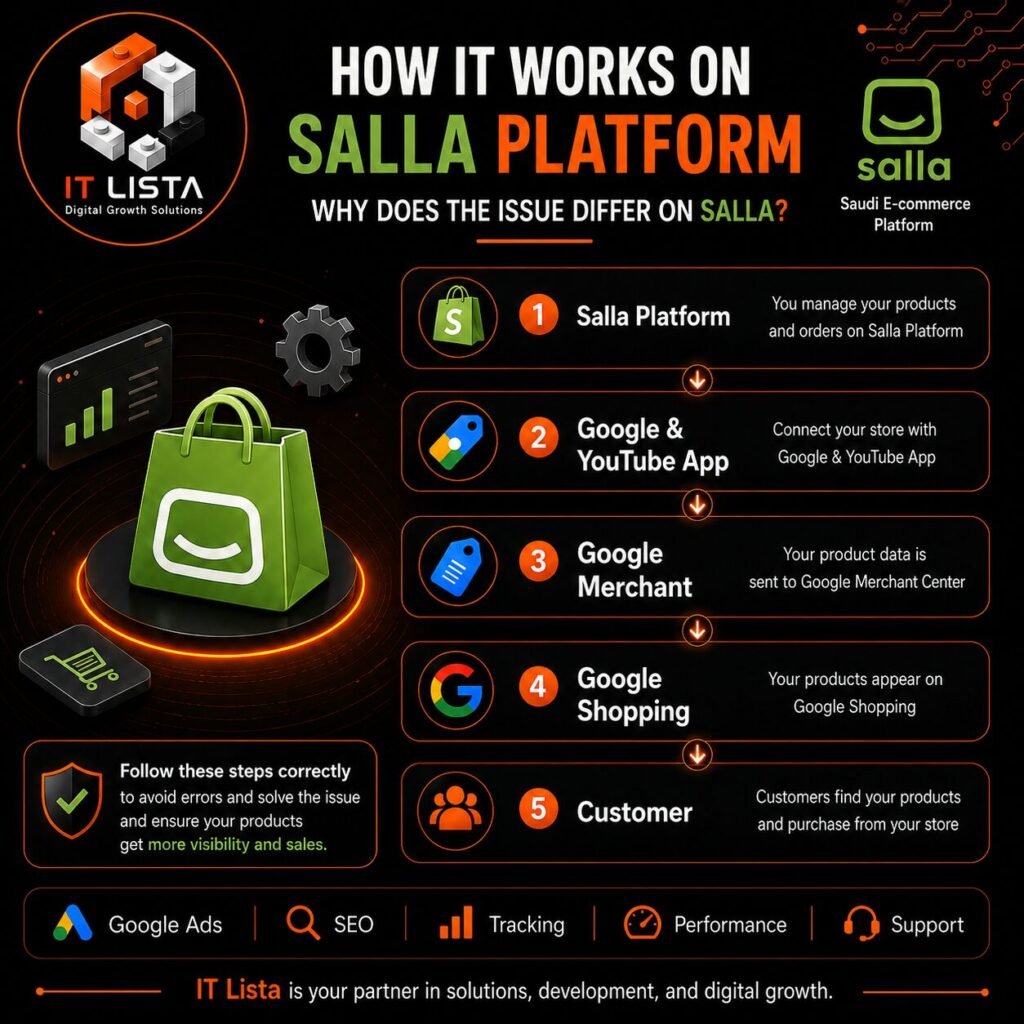
Next, review the product data submitted from your Salla store to Google Merchant Center.
Verify that the following attributes are accurate and up to date:
- Product ID
- Product Title
- Product Description
- Price
- Availability
- Product Image
- Brand
- GTIN or MPN (when applicable)
- Product Page URL
Additionally, whenever you update important product information in your Salla store, make sure the latest changes are synchronized correctly with Google Merchant Center.
As a result, Google can crawl accurate product data, reduce product errors, and improve your chances of maintaining a healthy Merchant Center account.
7. Check Your Website Befo7. Perform a Final Store Audit Before Requesting a Review
Before submitting your account for review, perform a final audit of your entire Salla store.
Make sure that:
- All important pages are accessible.
- There are no broken links.
- Your website uses HTTPS.
- Contact information is clearly visible.
- Store policies are complete and up to date.
- Product information is accurate.
- Prices and availability are synchronized.
As a result, you can reduce the risk of requesting a review while important issues are still unresolved.
8. Request a Google Merchant Center Review
Finally, after fixing all identified issues, you can request a review through Google Merchant Center when the review option becomes available.
During the review process, avoid making unnecessary major changes to your store unless they are required to resolve a specific issue.
Most importantly, remember that requesting a review without fixing the root cause of Google Merchant Misrepresentation on Salla may result in another rejection.
Therefore, always complete a full store and account audit before submitting your review request.
Common Mistakes to Avoid When Fixing Google Merchant Issues on Salla
When resolving Google Merchant Center issues, many Salla store owners focus only on the warning displayed in Merchant Center.
However, fixing one visible issue may not be enough if other problems still exist in your website, product data, or store settings.
Therefore, avoid the following common mistakes before requesting a review.
1. Requesting a Review Too Early
One of the most common mistakes is requesting a review immediately after receiving a warning.
Instead, review your entire store, business information, policies, and product data first.
Then, confirm that every identified issue has been fully resolved before submitting your request.
2. Fixing Only Disapproved Products
Updating or removing a few disapproved products does not always solve the real problem.
For example, Google Merchant Misrepresentation on Salla may be caused by incomplete business information, missing policies, or poor website transparency rather than a specific product.
Therefore, review your entire store instead of focusing on individual products only.
3. Using Copied Product Descriptions
Copying product descriptions from suppliers or other websites can reduce the quality and originality of your product pages.
Instead, write unique and informative descriptions that accurately explain each product, its features, and what customers will receive.
4. Ignoring Price and Availability Mismatches
Product prices and inventory levels change frequently.
As a result, your Salla store and Google Merchant Center may occasionally display different information.
Therefore, review your products regularly to ensure prices and availability remain synchronized.
5. Using Incomplete Store Policies
Creating a return or shipping policy page alone is not enough.
Instead, each policy should be complete, accurate, and consistent with your actual business practices.
For this reason, avoid generic templates that do not clearly explain your return, refund, shipping, or delivery processes.
6. Ignoring Broken Links and Incomplete Pages
Broken links, unfinished pages, and missing content can reduce customer trust and negatively affect your store.
Before requesting a review, carefully check your website and confirm that every important page is accessible and fully functional.
7. Making Major Changes During the Review Process
Once you submit a review request, avoid making unnecessary major changes to your website.
Instead, complete all important updates before requesting the review whenever possible.
This helps Google review a stable version of your store.
8. Focusing Only on Misrepresentation
Finally, do not ignore other Google Merchant Center warnings simply because your primary concern is Google Merchant Misrepresentation on Salla.
Product disapprovals, feed errors, shipping issues, price mismatches, missing product attributes, GTIN errors, availability mismatches, and policy violations can all affect your account performance.
Therefore, reviewing your entire Google Merchant Center account will help you build a healthier and more reliable setup for your Salla store.
How IT Lista Can Help with Google Merchant Issues on Salla
Resolving Google Merchant Misrepresentation on Salla often requires more than fixing a single warning.
In many cases, you need to review your website structure, business information, store policies, product data, and Google Merchant Center settings together.
IT Lista can help Salla store owners resolve a wide range of Google Merchant issues, including:
- Google Merchant Misrepresentation
- Merchant Center account suspension
- Product disapprovals
- Product feed optimization and data issues
- Price and availability mismatches
- Google Merchant Center setup and review
- Google Ads setup
- Google Analytics 4 implementation
- Google Tag Manager setup
- SEO optimization for e-commerce stores
Our goal is not only to resolve the current issue but also to improve the overall quality, consistency, and compliance of your online store.
As a result, your Salla store will have a stronger foundation for better visibility on Google Shopping and more successful digital marketing campaigns.
Frequently Asked Questions
Can a Suspended Google Merchant Center Account Be Recovered?
Yes, depending on the reason for the suspension.
However, you should first resolve the underlying issues, review your website carefully, and verify your product data before requesting a review through Google Merchant Center.
Is Salla the Reason for Google Merchant Misrepresentation?
No.
Google Merchant Misrepresentation on Salla is generally related to business transparency, store policies, product data, website quality, or compliance with Google policies—not the Salla platform itself.
Should I Delete Disapproved Products?
Not necessarily.
Deleting disapproved products alone usually does not resolve the root cause.
Instead, identify why the products were disapproved and correct the relevant data or policy issue.
Can Misrepresentation Happen Again After a Successful Review?
Yes.
If inaccurate information, policy violations, or product data mismatches appear again, your products or account may face additional issues.
Therefore, ongoing monitoring and regular store maintenance are essential.
How Can I Prevent Future Google Merchant Issues?
To reduce the risk of future problems:
- Keep your business information up to date.
- Maintain accurate store policies.
- Regularly review product data.
- Synchronize prices and availability.
- Monitor Google Merchant Center notifications frequently.
- Fix new warnings as soon as they appear.
By following these best practices, you can maintain a healthy Google Merchant Center account, improve your product visibility on Google Shopping, and reduce the likelihood of future account issues.

Conclusion
Google Merchant Misrepresentation on Salla can significantly affect your product visibility and, in more serious cases, may lead to Google Merchant Center account restrictions or suspension.
However, resolving the issue requires more than simply requesting a review. Instead, you should identify and fix the underlying causes before taking any further action.
Therefore, review your business information, store policies, product pages, pricing, availability, and product feed carefully. In addition, resolve any other Google Merchant Center issues, including product disapprovals, feed errors, shipping issues, GTIN errors, price mismatches, and policy violations.
By maintaining accurate product data, transparent business information, and a well-optimized Salla store, you can improve your compliance with Google Merchant Center policies and reduce the risk of future issues.
Ultimately, a properly optimized Salla store provides a stronger foundation for better visibility on Google Shopping, increased customer trust, and long-term e-commerce success.